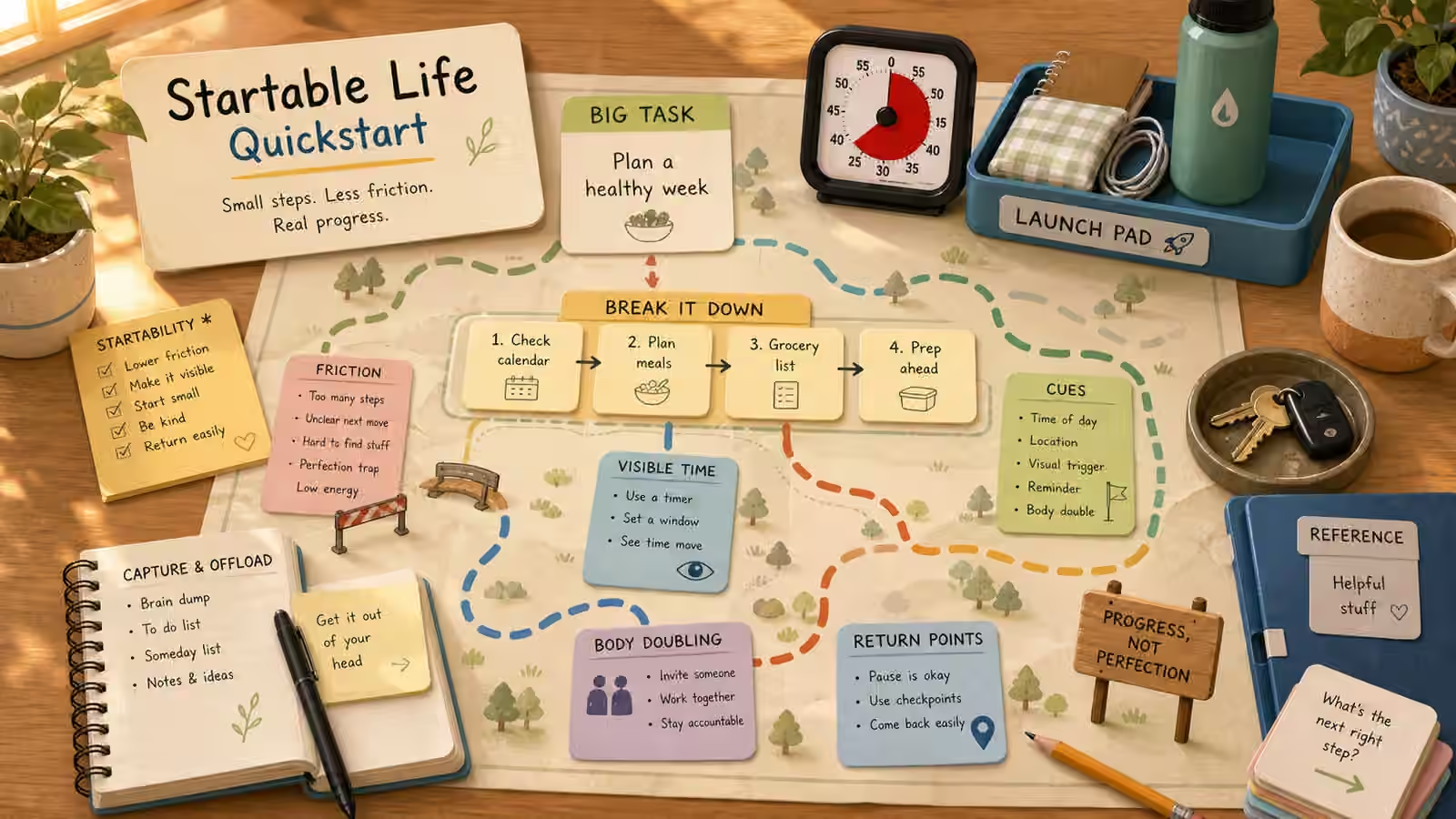
When a task refuses to start, the honest question is not “what is wrong with me.” It is “what is this task quietly asking me to do all at once.” A single stuck chore usually demands that you remember it exists, decide where to do it, choose what to open, judge what counts as enough, estimate how long it will take, and hold all of that in your head while also beginning. That is a heavy load to carry before the first move, and the load is invisible, which is why the failure feels like laziness instead of what it actually is: an overloaded moment. Startable Life Lab treats everyday follow-through as a design problem rather than a willpower problem, and this quickstart is the map of the whole approach in one read.
You do not need a new personality to get unstuck. You need a smaller first move and an environment that stops making invisible work look like a character flaw. Across the lab the same handful of levers keep showing up: making the first action physical, giving time a visible shape, keeping materials within reach, and leaving a clear way back after interruption. Learn to reach for the right one at the right moment and most “I’ll do it later” tasks lose their grip.
The four ideas that carry the rest
At the center sits startability. A task is startable when its very first action can happen in the real world without deciding six other things first. Most tasks arrive un-startable by default, bundled with hidden choices, and the work is to strip those choices away until one clean physical move is left. Startability is less a technique than a lens: you learn to look at any looming task and ask what is blocking the first thirty seconds specifically, not the whole project.
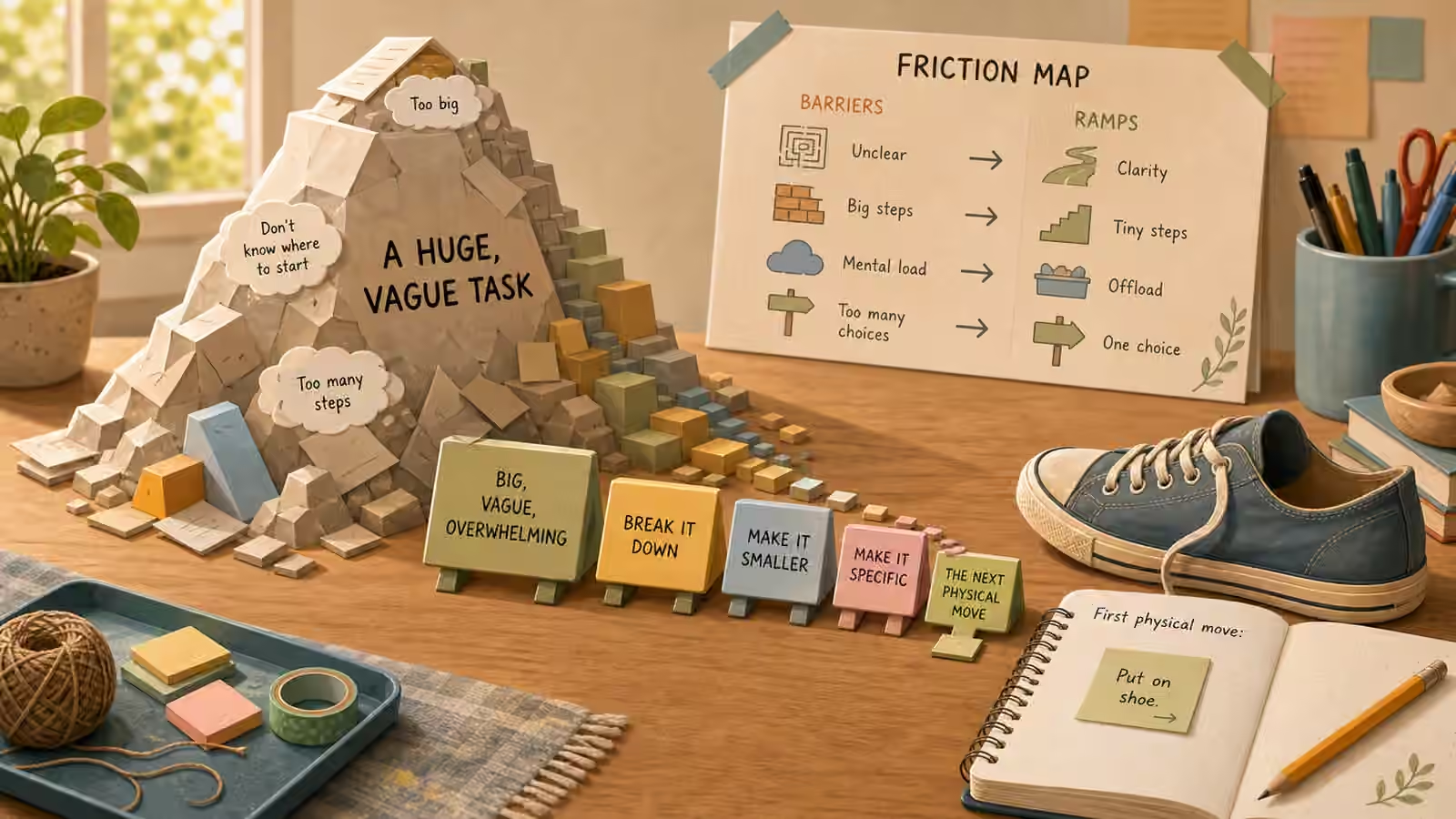
The second idea is the Start Line, the physical, observable move that begins the task, open the notebook, put the bill on the table, fill the water bottle, create the file. The third is visible time. Time is famously slippery for anyone whose attention wanders, and a timer, a clock you can actually see, a calendar block, or a buffer between tasks turns time from a fog into something you can steer. The fourth is the return point, the note or marker or open tab that lets you restart a task without rebuilding it from memory. Startability gets you in, the Start Line gives your hands something to do, visible time keeps you oriented, and return points let you leave and come back without paying full price twice. The rest of the lab, friction maps, offload stations, body-double scripts, transition ramps, is elaboration on these four.
A first pass you can run this afternoon
Rather than adopting the whole system at once, run it once on a single task and feel how it moves. Pick one thing that has been circling for more than a day, the kind of task that follows you around without ever getting touched. Write it first as the outcome you actually want, then underneath write the first visible action that would take less than thirty seconds. That gap between the outcome and the tiny action is where the whole method lives.
Now stage the first material in the exact place you will use it, not in a drawer, not “somewhere on the desk,” but positioned so the next move is obvious. Set a small timer, and here is the crucial part: set it for setup only, not for completion. You are not promising to finish; you are promising to arrange the starting position. Then, before you stop for any reason, leave a return point even if the task is nowhere near done. One honest pass through those steps teaches more than reading three guides, because you feel where your own resistance actually sits.
What a startable task sounds like
The difference between a stuck task and a startable one is almost always the language. “Do taxes” is a mood; “put the W-2 folder, the laptop, and the calculator on the table” is an instruction your body can follow. “Study biology” invites avoidance; “open the notes to the cell diagram page and copy one heading” invites a hand to move. “Clean the room” is a verdict on your whole life; “put a laundry basket by the door and drop five floor items in it” is a thing you can do in the time it takes to feel the dread. In every case you are naming what starts, what counts as enough for this round, and where the task will wait if you stop.
Keep these translations short. A script that grows into a paragraph has quietly become another task, and the whole point was to shrink the task below your resistance. This plain, observable language does something beyond productivity: it replaces blame with a next move. That makes it unusually useful in shared settings, a parent and child over homework, a couple over the paperwork pile, a team over a stalled project, because it swaps “why haven’t you” for “what is the first object and where does it go.”
The traps that quietly waste your effort
A few patterns reliably undo good intentions. The first is building a complete plan when the real block was only the first thirty seconds; you spend your best energy on architecture and have none left for the opening move. The second is treating a timer as a threat instead of a tool, letting a device meant to make time visible become one more source of dread, when a gentle clock or a progress marker would do the job without the panic. The third is skipping the return point because you expect future-you to remember everything, which is exactly the assumption that leaves tasks stranded. And the fourth, oldest trap of all, is buying a planner or an app before making a single real task startable. New tools feel like progress and cost nothing but money and time, while the actual work is unglamorous: one task, one first move, one place to return.
When systems are not enough
There is a line worth naming honestly. If these same starting problems are seriously affecting your school, work, safety, relationships, sleep, or basic daily care, practical systems can support you, but they are not a substitute for qualified help, and reaching for that help is a strong move, not a failure of the method. The lab is meant to make ordinary days more workable, not to diagnose anything or to replace a conversation with a professional who can actually assess what is going on.
For everyday practice, though, the instruction is small and repeatable: choose one task, make only its next start line more visible, do the first move, then stop and notice what changed and leave a return point. From here the natural next steps branch out. If evenings and mornings are where your follow-through breaks down, Sleep Setup Lab covers the room cues and routines that shape attention. If you want help breaking a task into reviewable steps without handing over the decision, AI Agents walks through using AI as a thinking partner rather than an autopilot. And when half-finished objects and projects pile up, Keepers Guild offers a calmer way to triage what you already own.