Robots do not see objects. They see objects under conditions.
That distinction is easy to miss when a camera feed looks clear to a person. A human can glance at a bench, ignore a reflection, infer that a shadow belongs to the overhead rack, and recognize a package despite glare. A robot vision system may treat the same scene as a set of pixels, depth returns, exposure settings, confidence scores, and uncertain edges. The object did not change, but the evidence available to the robot did.
Lighting belongs in the same conversation as Robot Perception and Robot Sensor Fusion and Uncertainty . It is not merely a facility detail. It changes what sensors report, how models behave, how calibration holds up, and how often a robot asks for help. A deployment that ignores visual conditions may look like it has an autonomy problem when it really has an evidence problem.
Good Lighting Is Task-Specific
There is no universal “bright enough” for robotics. A mobile robot navigating a hallway may need stable contrast at floor level, clear obstacle edges, and limited glare from glass. A robot arm picking parts from a tray may need shadow control, surface contrast, and a camera angle that keeps the object visible through the reach. An inspection robot may need consistent illumination that reveals defects without hiding them in specular highlights.
The useful question is not whether the space is well lit for people. It is whether the robot receives the evidence the task requires. A human worker can move their head, bring a part closer, or use touch. A fixed camera may have one view. A wrist camera may see the object only after the arm blocks the main light. A depth sensor may behave differently on black rubber, shiny film, transparent plastic, or angled metal.
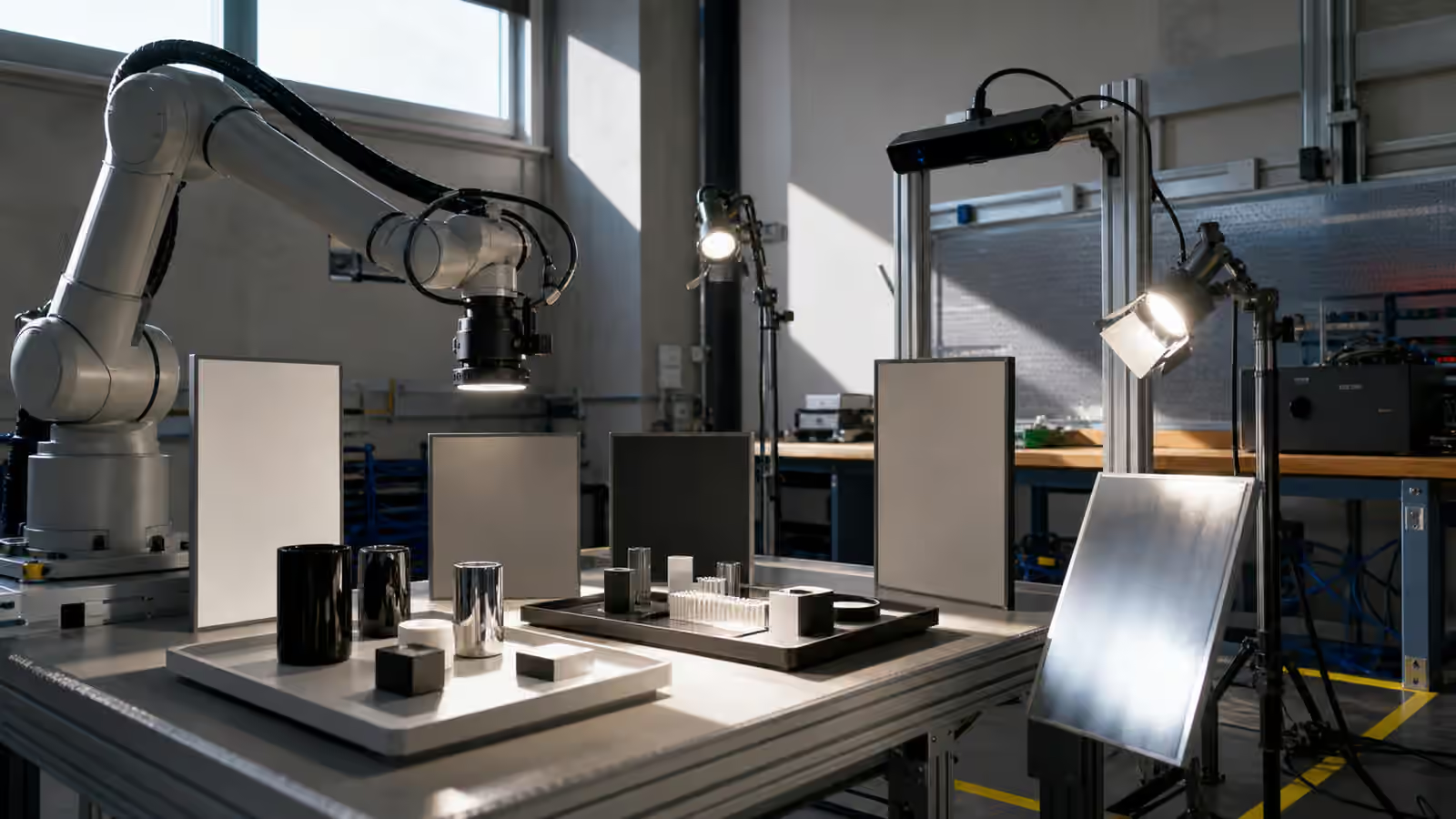
Robot Workcell and Fixture Design makes this practical. A workcell can place lights, backgrounds, trays, and cameras so the robot sees repeatable structure. If every object arrives under a different shadow, the vision model is being asked to solve a facility problem as well as a perception problem.
Glare Is Not Just Brightness
Glare can defeat a system even in a bright room. A glossy package may reflect a light into the camera. A stainless surface may produce an edge that looks like an object boundary. A clear guard may add a ghost image. A polished floor may confuse a low-mounted sensor. A window may create a stripe of sunlight that moves across the route during the day.
People often describe glare as a camera issue, but it is really a geometry issue. The light source, surface, camera, and robot approach angle form the problem together. Moving a light, changing a tray material, adding a matte background, or adjusting the camera angle may help more than retraining a model. The point is not to avoid shiny things forever. It is to decide which visual facts are stable enough for the task.
Robot Calibration and Alignment also matters because glare can make calibration look healthy while task perception fails. A camera may calibrate correctly with a target and still struggle with the materials it will actually see. Validation should include the surfaces, lighting, and approach directions of the real job.
Shadows Can Hide The Failure
Shadows are useful to people because they reveal shape. They can be dangerous for robots because they can merge with objects, hide gaps, or move between runs. A robot that sees a dark region under a part may not know whether it is a shadow, a hole, a cable, or a different material. A robot that relies on color contrast may lose the object when a worker’s arm casts a shadow over the tray.
The problem becomes sharper when the robot moves. A manipulator can cast its own shadow over the scene during the final reach. A mobile robot can drive from a bright aisle into a dim storage area, then ask the same perception model to make decisions. A home robot can work in morning sun, evening darkness, and mixed artificial light, often with no trained operator watching.
This is why lighting tests should include motion, not only static images. Does the robot still see the target when the arm enters the scene? Does the camera recover from exposure changes before the robot commits to motion? Does a route remain legible when the robot passes a window? These questions belong in Robot Task Design and Acceptance Tests because visual conditions are part of the task boundary.
Exposure Choices Are Behavior Choices
Camera exposure sounds like a low-level setting, but it can affect robot behavior. A system tuned to preserve bright regions may lose detail in dark objects. A system tuned for shadows may blow out reflective labels. Auto-exposure may shift during a grasp and change the image right when the robot needs stability. A camera that adjusts slowly may report stale-looking evidence after a lighting transition.
A robot should not treat exposure as a hidden detail when decisions depend on vision. Field logs can record exposure state, confidence, and lighting-related failures so that support teams can distinguish perception drift from environmental drift. Robot Observability and Field Logs becomes valuable here because a failed pick without visual context is hard to diagnose. The team needs to know whether the object was occluded, washed out, shadowed, or simply outside the model’s experience.
Some deployments can control exposure tightly because the workcell is stable. Others need robust variation because the robot travels through changing spaces. The architecture should be honest about which world it is in. A system that only works under fixed light can be valuable, but it should not be sold or accepted as if it handles every shift, window, and material change.
Visual Conditions Drift Over Time
Lighting is not fixed after installation. Bulbs age. Fixtures are replaced. A skylight gets covered. A new rack blocks light. A safety shield is added. Floor tape wears. A camera cover gets dusty. A seasonal sun angle reaches a route that was tested in another month. A maintenance team changes a lamp type and unintentionally changes color temperature or flicker behavior.
These changes can be small enough that people adapt without noticing. The robot may not. A model trained on one lighting distribution may become less confident. A marker may be harder to read. A glossy surface may create a new reflection. A depth sensor may report noisier data. The field symptom may appear as random failures even though the environment changed in a patterned way.
Robot Site Change Management should include visual changes for this reason. Moving a light or changing a background can be as important to a robot as moving a shelf. The site does not need a formal review for every bulb, but it needs a way to notice when visual conditions tied to robot work have changed.
Better Light Can Reduce AI Load
A stable visual setup can make a modest robot more useful. It can reduce false detections, improve grasp pose estimates, lower intervention rates, and make failure cases easier to interpret. That does not mean the environment is cheating. It means the task has been engineered. The robot still has to sense, plan, move, recover, and report. Better evidence lets those abilities work closer to their intended range.
This is especially important when teams compare robots. A vendor demo in a controlled lighting booth may show what the system can do with excellent evidence. A field pilot in mixed light shows what it can do with the site’s evidence. Robot Demo Evaluation asks what the video leaves out. Lighting is one of the common omissions.
The practical goal is not cinematic perfection. It is visual repeatability where repeatability matters, visible variation where variation must be handled, and honest refusal when the scene becomes unreadable. A robot that says it cannot see well enough is often safer and more useful than one that guesses confidently under bad light.
The Machine Sees The Arrangement
Lighting should be designed with the whole arrangement in mind: camera, object, surface, background, robot motion, human workflow, maintenance, and logs. A bright fixture in the wrong place can create glare. A matte surface can help perception but collect dirt. A camera angle can avoid shadows but make maintenance harder. A light that helps the robot may bother workers if it shines into their eyes. The right design respects both machine evidence and human work.
When visual conditions are treated as part of deployment, perception failures become less mysterious. The team can ask whether the scene was inside the validated envelope, whether the sensor evidence was good enough, and whether the robot responded appropriately when it was not. That is a stronger conversation than blaming “the AI” for every bad frame.
Physical AI becomes more dependable when the world is not only visible, but visible in the way the task requires. The robot does not need perfect vision. It needs visual conditions it can interpret, monitor, and refuse when the evidence is no longer good enough.