Complete Switch Guide
The switch is the heart of a mechanical keyboard: it decides how every keypress feels, and it heavily influences how your board sounds. The trick is that switches don’t live alone—keycaps, plate material, mounting style, stabilizers, and even your desk surface can make the same switch sound totally different. This guide gives you a clear mental model so you can choose confidently and tune intentionally.
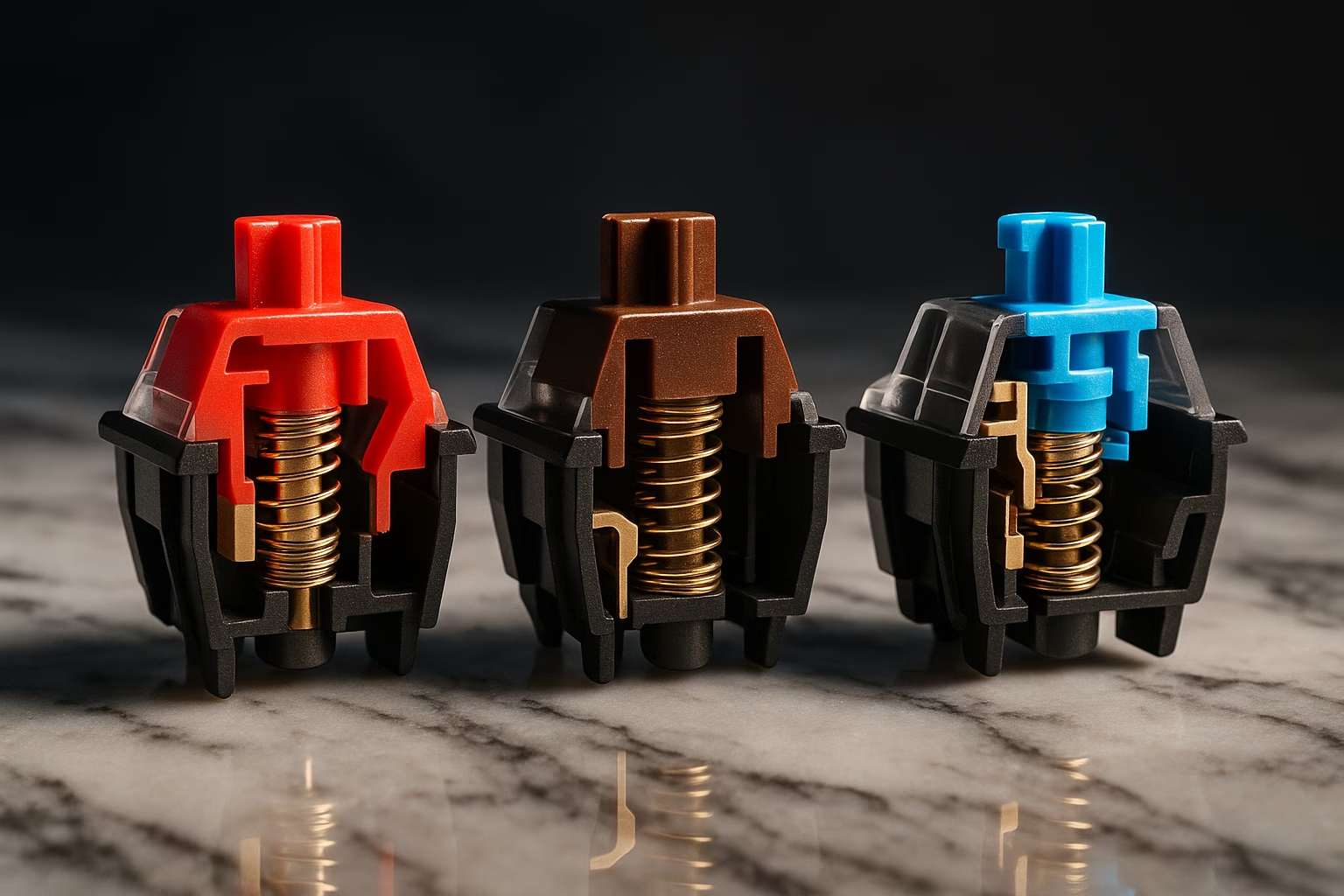
How Mechanical Switches Work
Most “MX-style” switches share the same basic anatomy: a stem moves inside a housing, compressing a spring. At a certain point in travel, metal contacts meet and the keyboard registers the keypress.
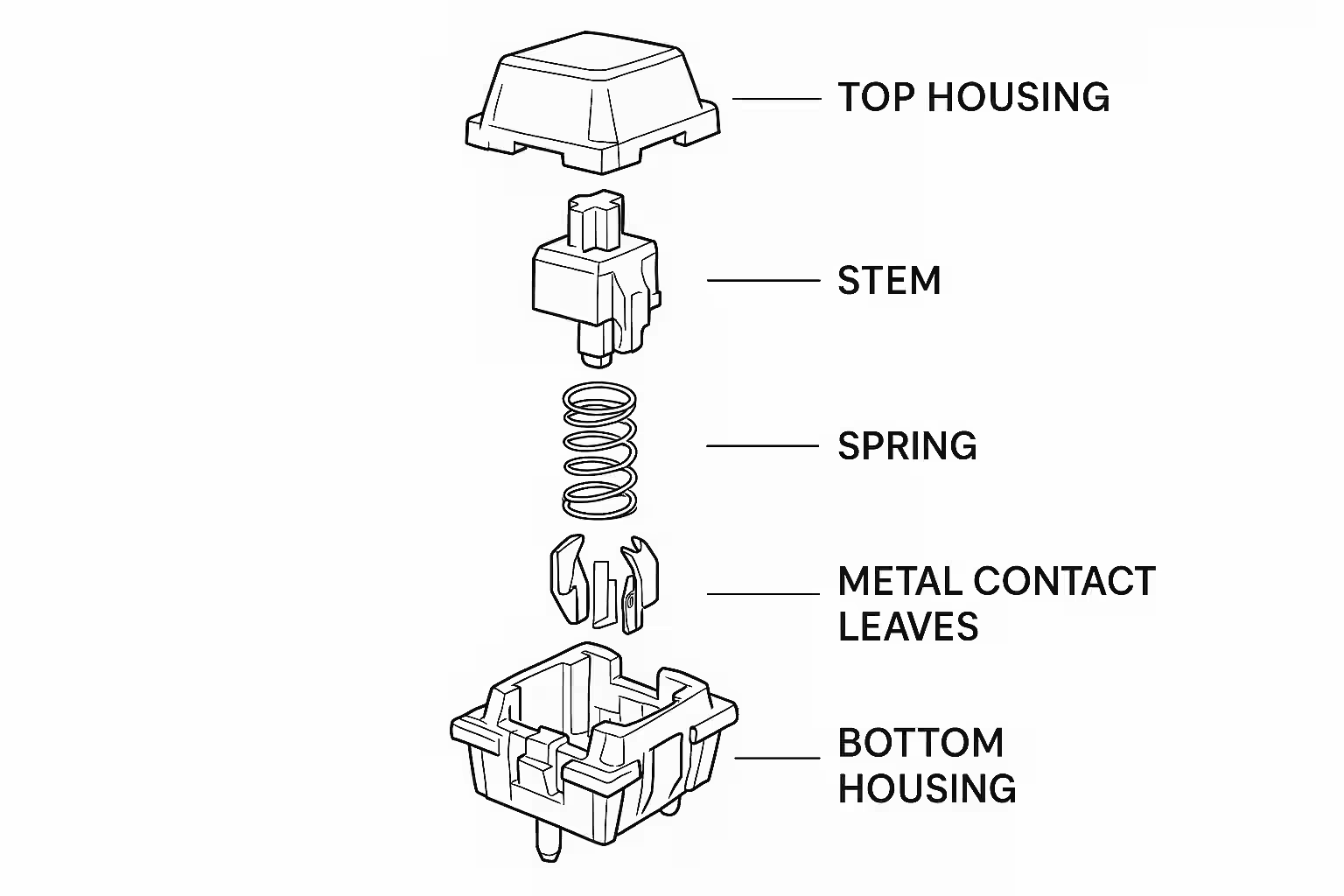
In simple terms, the housing keeps everything aligned and contributes a surprising amount to acoustics, the stem is the moving part that largely determines whether a switch feels linear, tactile, or clicky, the spring sets the resistance and return, and the metal contacts are what actually register the keypress. Clicky switches add one more ingredient: a dedicated mechanism, usually a click jacket or click bar, whose whole job is to announce itself.
Travel is usually described in two numbers:
- Actuation: when the key registers (commonly around 2.0mm).
- Total travel: how far the switch can move (commonly around 4.0mm).
The Three Main Switch Types
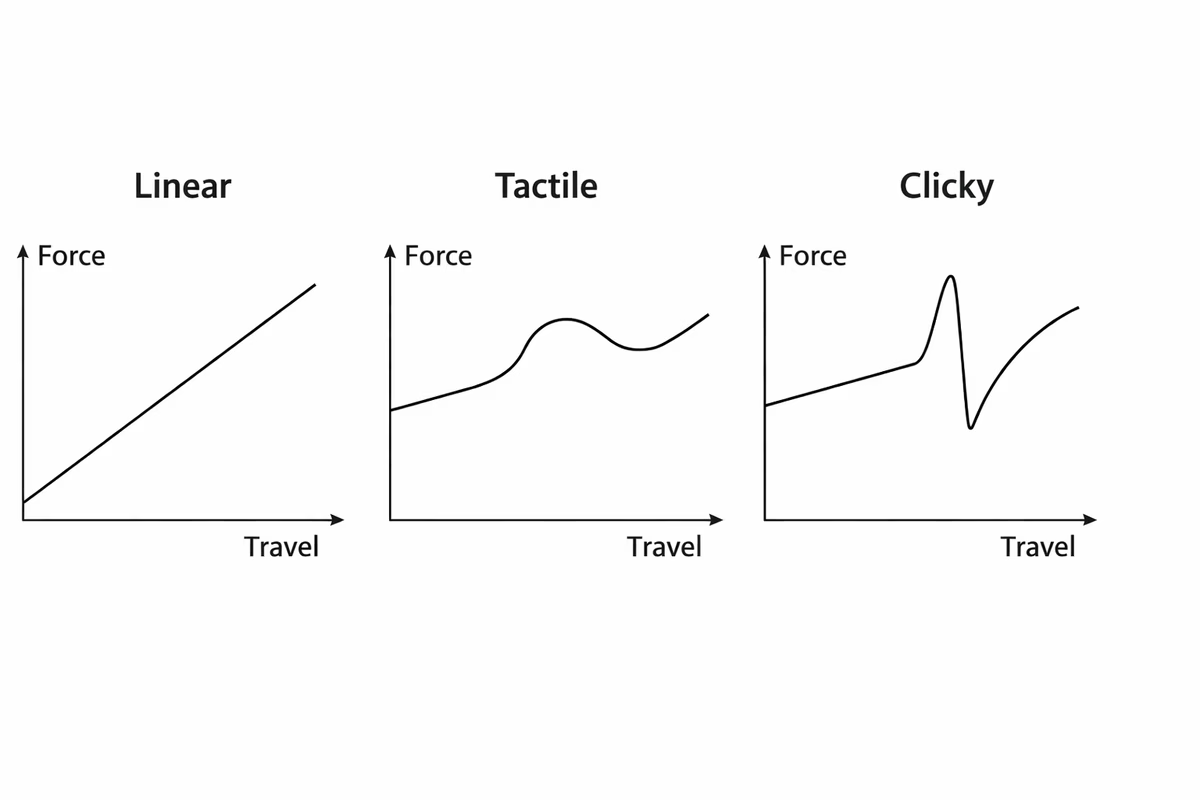
Linear Switches
Linears move smoothly from top to bottom with no intentional bump. When people say a switch feels “clean,” “buttery,” or “fast,” they’re often describing a good linear with a spring weight that matches their fingers.
Where linears shine
Linears shine when you want uninterrupted travel. That makes them popular for gaming and rapid repeats, but plenty of typists love them too because the motion feels clean and low-drama over long sessions. They are also the easiest family to push toward the classic “creamy” or “thocky” sound profile once you start tuning a board.
Good starting points
If you want sensible first stops, Gateron Yellow remains the classic value linear, Cherry MX Red or Black gives you a reliable baseline in lighter or heavier form, and Kailh Box Red is worth trying if you want the more stable feel that comes from the box-style design.
Tactile Switches
Tactiles add a noticeable bump that tells your fingers, “the key actuated.” A good tactile can reduce bottoming out for some typists and can feel more deliberate for writing or coding.
Where tactiles shine
Tactiles make the most sense for people who want feedback without turning the keyboard into a percussion instrument. They are often strong all-purpose switches for mixed work and play, and they can help if very light linears make you feel like you are triggering keys by accident.
Good starting points
Cherry MX Brown is still the common mild first tactile, Boba U4T is the enthusiast favorite when you want a bigger bump and a fuller tone, and Durock T1 sits in the very useful middle ground of strong feel at a reasonable price.
Clicky Switches
Clickies are tactiles with an extra mechanism that produces an audible click. They’re unmistakable, polarizing, and often the most fun you can have alone in a room.
Where clickies shine
Clickies are for people who actively enjoy audible feedback and want each keypress to feel like an event. They make the most sense in solo environments, tolerant households, or purely fun builds where nostalgia and drama are part of the brief.
Good starting points
Cherry MX Blue is the familiar reference point, Kailh Box White gives you a crisp lighter click, and Box Jade or Navy are what you reach for when “subtle” is not remotely the goal.
Silent Switches (A Special Category)
Silent switches add dampening pads (usually on the stem) to reduce bottom-out and top-out noise. The best silent builds aren’t just quiet—they’re clean: no rattle from stabilizers, no spring ping, no random case resonance.
Good starting points
Boba U4 is a common quiet-office favorite, Cherry MX Silent Red or Black are the dependable easy-to-find silent linears, and Zilent V2 is the premium option when you want silence without settling for a bland feel.
Switch Specifications (What Actually Matters)
Specs can look intimidating, but most of them answer simple questions: how heavy, how far, and how fast does it register?
Actuation force (how heavy it feels)
Force is typically listed in grams (g) as a rough indicator of how much pressure is needed. It’s not perfectly comparable across brands, but it’s still useful.
| Feel | Typical range | Notes |
|---|---|---|
| Light | 45–50g | Easy to press, higher chance of accidental presses |
| Medium | 55–62g | A common “all-day typing” zone |
| Heavy | 65–80g | Deliberate presses, more finger fatigue for some |
Actuation point (when it registers)
Standard actuation is usually around 2.0mm, but “speed” switches may actuate closer to 1.1–1.4mm. Shorter actuation can feel snappier for gaming, but it can also increase accidental presses if you rest your fingers heavily.
Total travel (how far it moves)
Most MX switches have ~4.0mm travel. Low-profile switches are usually shorter (~3.0–3.5mm) and feel different enough that they’re worth treating as a separate category when shopping.
Lifespan (how long it lasts)
Switch lifespan is often quoted in tens of millions of presses. In practice, even “50 million” is many years of heavy use—so don’t let lifespan be your deciding factor unless you’re buying extremely low-quality switches.
Switch Brands (How to Think About Them)
Brand matters most as a signal of consistency: tolerances, factory lubrication, and spring quality. Within any brand, specific switch models still vary a lot.
Cherry MX (Germany) — The Original Baseline
Cherry is the reference point for MX-style switches. They’re reliable and widely compatible, but many modern alternatives are smoother out of the box for less money.
Gateron (China) — Smooth and Affordable
Gateron became popular by offering smooth travel at great prices. If you want a “safe pick” that isn’t expensive, Gateron is often the answer.
Kailh (China) — Variety and Innovation
Kailh’s Box switches and click bars are distinctive. If you want a stable stem feel or you love clickies, Kailh is worth a look.
Boutique / Enthusiast Options
At the enthusiast end, Gazzew is respected for tactiles and silent switches that feel unusually dialed in, Zeal trades on premium polish and premium pricing, Durock covers a lot of ground with strong value, and Holy Panda still carries the reputation of a tactile switch people chase partly for feel and partly for lore.
Switch Modding (When You Want to Tune the Feel and Sound)
Modding is optional. Stock switches can be great. But if you’re chasing a specific feel (smoother, less ping) or a specific sound (creamier, deeper), these are the common levers.
Lubing
Lubing reduces friction noise and can make a switch feel and sound more consistent. Done well, it turns “scratchy” into “smooth” and often rounds off harsh high frequencies. Done poorly, it can make a switch feel sluggish and sound dull.
Common lubes:
| Use | Common choices |
|---|---|
| Linears | Krytox 205g0, Tribosys 3204 |
| Tactiles (careful) | Tribosys 3203 (avoid the tactile bump area) |
| Springs | Krytox GPL 105 (oil) |
Films
Films sit between housings to tighten tolerances. They help most when a switch has housing wobble. Many modern switches don’t need films, so it’s best treated as an “if necessary” tweak.
Spring swapping
Springs are the cleanest way to change a keyboard’s “effort level.” If you love a switch’s sound but hate the weight, spring swapping can be more effective than buying an entirely new switch.
Finding Your Perfect Switch (Without Overthinking It)
If you’re unsure, the fastest path is to make the decision small, then scale up.
- Decide your environment: quiet required, or sound is welcome?
- Pick a family: linear for smoothness, tactile for feedback, clicky for sound.
- Pick a weight band: light, medium, or heavy.
- Try before you commit: a switch tester or a hot-swap keyboard saves money long-term.
A simple “first try” sampler looks like this:
- Linear: Gateron Yellow, Cherry MX Red (or Black)
- Tactile: Cherry MX Brown, Boba U4T
- Clicky: Cherry MX Blue, Kailh Box White
Once you know what you dislike (too heavy, too loud, too bumpy), the space of options collapses quickly.
Common Switch Myths (A Reality Check)
Cherry is not automatically “the best”; it is better understood as the historical baseline that newer brands compete with. You do not have to lube switches for a board to be good, because lubrication is a tuning option rather than an entry requirement. Linears are not just for gaming, heavier springs are not inherently better, and clicky does not mean more tactile. In practice, the strongest bumps often come from non-clicky tactiles, while the best weight is simply the one you can use comfortably for hours.
Recommendations by Use Case (Starting Points)
These aren’t “the best switches,” they’re sensible first picks that are easy to find and representative of their category.
| Use case | What to look for | Good starting points |
|---|---|---|
| Gaming | light/medium linear, clean return | Gateron Yellow, Cherry MX Speed Silver, Kailh Box Red |
| Typing / writing | medium tactile with clear bump | Boba U4T, Durock T1, Cherry MX Brown |
| Office / shared space | silent switches + tuned stabilizers | Boba U4 (silent tactile), Cherry Silent Red |
| All-purpose | medium tactile or medium linear | Gateron Yellow, Gateron Brown, Cherry MX Brown |
| “I want the sound” | clicky switches | Kailh Box White, Box Jade, Cherry MX Blue |
Takeaway
Pick your environment first (quiet vs expressive), then choose a switch family (linear/tactile/clicky), then weight. After that, everything else is refinement. The best switch is the one you enjoy using—and the one that fits your life without annoying everyone around you.
Next Steps
Once you know your switch direction, use Keyboard Layouts to choose a size, Building Guide to assemble a board around that choice, and Keycaps Guide to keep shaping feel and sound.