
A Quiet Mechanical Keyboard for a Loud Office (A Practical Build Story)
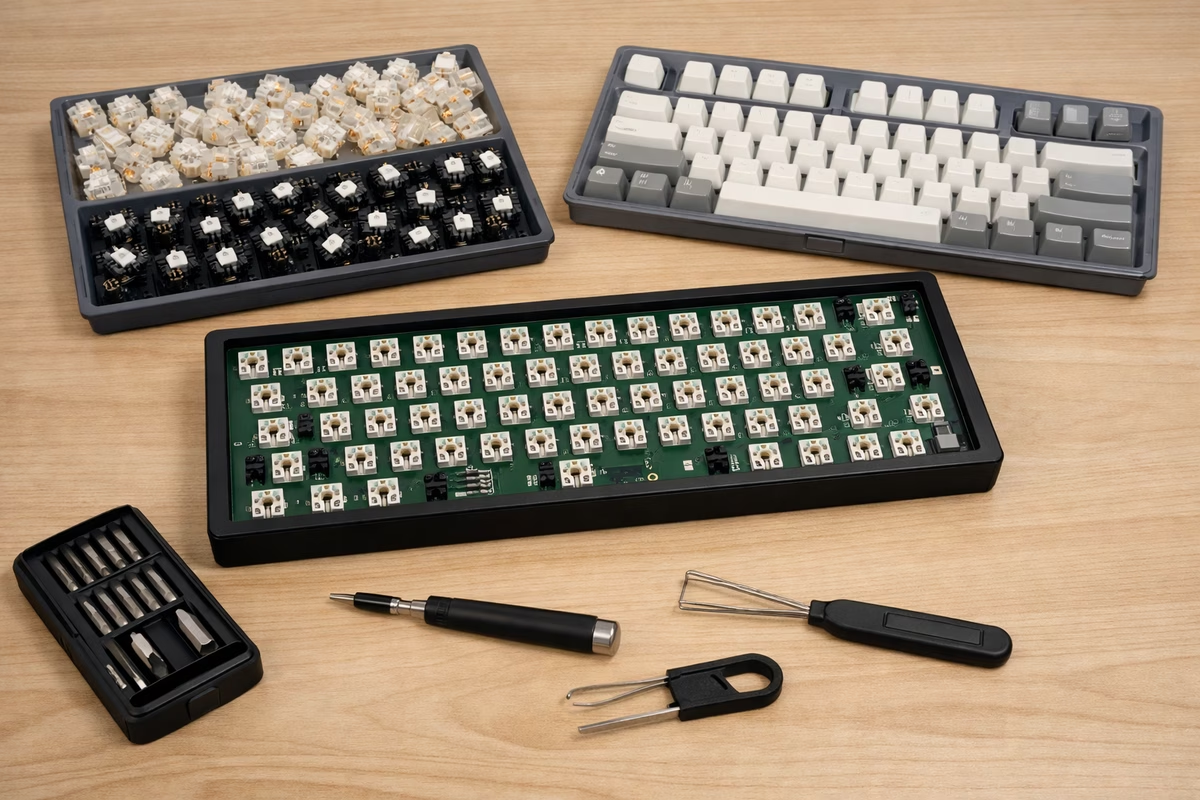
The first time I brought a mechanical keyboard into a shared office, I had watched a few too many build videos and thought foam could fix anything.
It sounded great at home. At work, it was loud enough to notice.
The room had hard floors, a low ceiling, and desks that carried every sound.
That is when you learn what quiet means. Quiet is sound that stays in the background.
This guide is about building a keyboard that still feels good without taking over the room.
Quiet is a system, not a switch
Most beginners try to fix office noise with one purchase: silent switches. They help, but they are only one part of the problem. Office noise usually comes from four places:
- Bottom-out: the keycap and switch stem hitting the bottom of travel.
- Top-out: the stem returning and tapping at the top.
- Stabilizer noise: the rattle and tick on big keys.
- Resonance: the case and desk amplifying everything.
You can cut all four without making the board feel dead. The goal is not sponge typing. It is to keep the feel of a mechanical board while cutting the sharp parts.
If you remember one thing, remember this. A quiet board needs control over impact and resonance.
The moment it becomes quiet: choosing impact first
Step 1: Choose the type of quiet you want
Quiet boards usually fall into two types:
- Soft-quiet: cushioned, low-pitched, forgiving. Great for long workdays and shared spaces.
- Crisp-quiet: muted but snappy, with a clean attack. Great if you hate “pillow typing.”
Soft-quiet is easier to get right. Crisp-quiet takes more tuning and better parts.
Step 2: Pick the right silent switch (and don’t over-spec it)
Silent switches use dampening to reduce bottom-out and top-out. That is why they help.
A simple way to choose:
- If you want office-safe and still satisfying, start with a silent tactile.
- If you want maximum quiet and a smooth feel, choose a silent linear.
A few things worth knowing:
- You do not need heavy switches to be quiet. Heavy switches often make people hit harder.
- Lubing matters on silent switches. Many feel scratchy or rubbery stock. A careful lube job helps.
- Silent does not mean silent in every board. The same switch sounds different in different cases and on different desks.
If you are building for an office, choose a switch you can use for eight hours. Quiet does not matter if the board feels bad to type on.
The office villain is usually the stabilizers
In a shared room, most people hear the big keys more than the alphas: spacebar, enter, and backspace.
A quiet build often fails because everything is quiet except the spacebar.
A practical stabilizer approach:
- Use good stabilizers (or at least consistent ones). If your board came with mystery stabs, replacing them is often the single biggest quality upgrade.
- Lube the housings and wires to remove scratch and rattle.
- Focus on the wire ends. That’s where ticking lives.
- Don’t over-lube. Too much grease can create sluggish return and a “wet” feel.
If you only have time for one thing, tune the spacebar.
Controlling resonance: the part YouTube doesn’t warn you about
My first quiet build still bothered people because the desk amplified the sound.
Office resonance usually comes from three places:
- The case cavity (hollow boards echo).
- The mounting system (some mounts transmit vibration more directly).
- The desk surface (especially laminate or big hollow tops).
A practical fix stack that stays sane:
1) Use a desk mat (seriously)
A desk mat is not just decoration. It cuts the sound that travels into the desk.
If you want the biggest easy win, start there.
2) Add just enough dampening
Internal foam can help, but too much can make the board feel flat. The usual middle ground is:
- A thin case foam to reduce hollow resonance.
- Optional plate foam if the board has harsh high frequencies.
The goal is control, not muffling.
3) Choose keycaps that don’t ring
Thicker keycaps often sound calmer. Thin caps can make even silent switches sound sharp.
Keycap profile matters too. If a profile makes you type harder, it works against the rest of the build.
The “quiet build” recipe that actually works
If you want a simple starting point, use this:
- Layout: 75% or TKL (less sprawling movement, fewer accidental slams)
- Switches: silent tactile or silent linear (comfort first)
- Stabilizers: tuned (spacebar is the priority)
- Keycaps: thicker caps that feel pleasant over long sessions
- Dampening: minimal internal foam + desk mat
- Typing habit: lighter touch over time (quiet gets easier as your hands adapt)
The last part matters more than it looks. A good board can make you type with less force.
A quiet keyboard is a gift you give the room
The best compliment a quiet keyboard gets is being ignored.
When it is tuned well, it blends into the normal sounds of an office. Typing should be just another small sound in the room.
When nobody notices your keyboard, it is doing its job.
If you want the technical deep dives that pair well with this story, read Sound profiles , Stabilizers , and Maintenance .
Make the keyboard serve the hands
Mechanical keyboard work can drift into parts collecting unless it returns to use. For Quiet Mechanical Keyboard for a Loud Office, the useful question is how sound, feel, layout, maintenance, desk space, firmware, and typing habits work together for the person at the desk.
Start with the problem you can feel. Is the board too loud, too tall, too stiff, too cramped, too unstable, or too distracting? A clear complaint makes the next change easier. Without it, every switch, foam, cap, and case sounds equally tempting.
Then change one variable. Swap keycaps before rebuilding the whole board. Test a switch sample before ordering a full set. Adjust layers before buying another compact layout. Clean and stabilize before assuming the design is wrong.
Good notes save money. Record switch, spring, keycap profile, plate, foam, desk mat, and what actually changed. The ear and fingers forget faster than expected.
Quiet Mechanical Keyboard for a Loud Office should make the board more personal and more usable, not merely more elaborate. The best keyboard disappears into the work when it needs to.