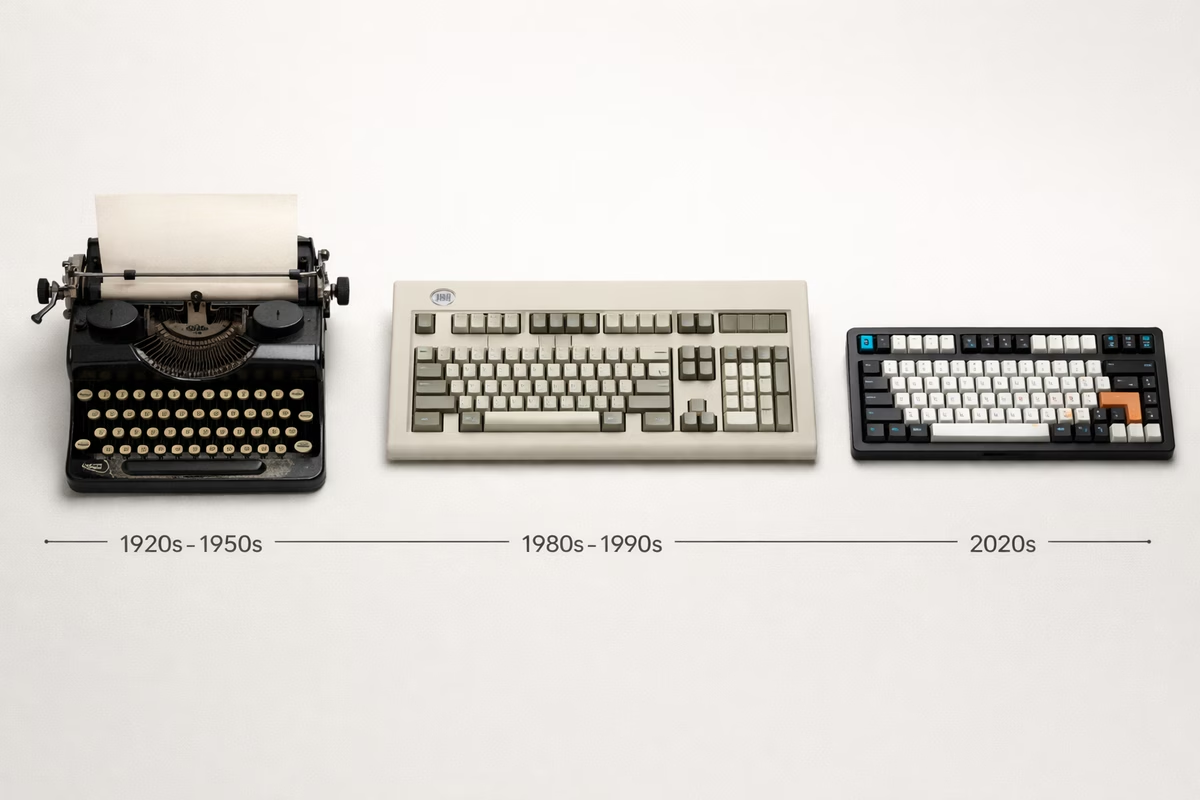
History of Mechanical Keyboards
The story of mechanical keyboards spans over a century, from clunky typewriters to today’s precision-engineered customs. Understanding this history helps us appreciate why mechanical keyboards matter.
The Typewriter Era (1868-1960s)
1868: The Sholes and Glidden Typewriter
The Beginning: Christopher Latham Sholes invented the first practical typewriter. It featured: Mechanical key switches (levers and springs), the QWERTY layout (designed to prevent jamming), and tactile/audible feedback with every press.
Why It Matters: This established the foundation for mechanical switches and the QWERTY layout we still use today.
QWERTY Layout Origins
The Design Problem: Early typewriters jammed when adjacent keys were pressed quickly. Sholes arranged common letter pairs (like “TH”) far apart to prevent jamming.
The Result: QWERTY became the standard, not because it’s optimal, but because it solved a mechanical problem that no longer exists.
Alternative Layouts: Dvorak (1936), Colemak (2006), and Workman (2010) are common alternatives; each tries to reduce finger travel or improve comfort and speed compared to QWERTY.
Why QWERTY Won: Network effects. Everyone learned QWERTY, so it became entrenched despite better alternatives existing.
Early Computing Era (1960s-1980s)
IBM Beam Spring (1960s-1970s)
The Premium Keyboard: IBM’s first major keyboard used capacitive beam spring switches: It was extremely tactile, very expensive to manufacture, and heavy (often over 10 lbs), built for IBM mainframes rather than consumer desks.
Legacy: Set IBM’s reputation for quality keyboards. Extremely rare and collectible today.
1970s: Hall Effect Keyboards
The Technology: Keyboards using magnetic Hall effect sensors instead of metal contacts: Because they avoid metal-on-metal electrical contact, they can be extremely durable (less wear), can support analog-style input, and historically showed up in aerospace and industrial contexts.
Modern Revival: Hall effect keyboards are making a comeback in 2024 with gaming keyboards offering adjustable actuation points.
The Golden Age (1980s-1990s)
1984: IBM Model M - The Legend
The Icon: IBM Model M, released in 1984, remains the most influential keyboard ever made.
Technology: Buckling Spring Buckling spring means the spring collapses at the actuation point, creating the distinctive “click‑clack” sound and a tactile event you can’t miss. It’s also famously durable; many boards still work after 40+ years.
Specifications: The Model M is heavy (around 5.5 lbs / 2.5 kg), typically uses durable keycaps, and popularized the full-size layout with function keys. The practical lifespan is “indefinite” if it’s cared for.
Cultural Impact: It defined “quality keyboard” for a generation, inspired the modern mechanical revival, and is still manufactured today (Unicomp). You still see them in hospitals, industrial environments, and enthusiast collections.
Why People Love It: People love it for the feel and sound, the indestructible build, and the nostalgia/statement‑piece vibe.
Why Some Don’t: People avoid it because it’s very loud (office nightmare), heavy and bulky, has some non-standard quirks, and can be pricey on the used market.
1983: Cherry MX Switches Invented
The Revolution: Cherry Corporation (Germany) invented the Cherry MX switch, creating the modern mechanical switch standard.
The Innovation:
- MX-style stem (cross shape) for keycap compatibility
- Multiple variants (Red, Blue, Brown, Black, etc.)
- Modular design (housing + stem + spring)
- 50-100 million keystroke lifespan
Cherry MX Color Codes (Original): Cherry’s “color” vocabulary became a shorthand: Black (linear, ~60g) was among the earliest; Blue (clicky) became a typing favorite; Brown (tactile, ~55g) turned into the all-purpose workhorse; and Red (linear, ~45g) became a gaming standard.
Why MX Won:
- Reliable and consistent
- Standardized design (easy manufacturing)
- Wide variety of types
- Compatible ecosystem
1990s: Keyboard Variety
The Peak: The 1990s had incredible keyboard diversity: You could find buckling spring boards, Cherry MX boards, Alps switch boards (SKCM/SKCL), Topre electro‑capacitive boards, and the rising tide of membrane keyboards.
Alps Switches: Popular alternative to Cherry MX in 1980s-90s: Alps had a different mount, a distinctive smooth tactile feel, and appeared in iconic boards like the Apple Extended Keyboard. Many variants are discontinued now, which is why they’re collectible.
Apple Extended Keyboard (1987): Used Alps switches, considered one of the best typing keyboards ever. Sought after by collectors today.
The Dark Ages (2000s)
The Membrane Takeover
What Happened: By the 2000s, mechanical keyboards nearly disappeared from consumer markets.
Why: The reasons were mostly economic: membrane keyboards were dramatically cheaper to manufacture, companies chased margins, most consumers didn’t know the difference, and “good enough” won for bundled office hardware.
The Result: Mechanical keyboards became niche products for:
- Enthusiasts who refused to downgrade
- Industrial/medical applications
- Point-of-sale systems
- A few gaming keyboards (Razer, SteelSeries)
Cherry MX Patent: Cherry’s MX switch patents (filed 1980s) protected their design until ~2014. This limited competition and innovation.
The Gaming Revival (2010-2014)
Gamers Rediscover Mechanical
The Spark: Competitive gamers and streamers discovered mechanical keyboards offered advantages:
- Faster actuation
- N-key rollover (register all simultaneous keypresses)
- Consistent feel
- Durability
Key Brands:
- Razer (2010): Razer BlackWidow - First mainstream gaming mechanical keyboard
- Corsair (2013): Corsair K70 - Aluminum gaming keyboard
- Logitech (2014): Logitech G710+ - Mainstream mechanical option
Custom Switches: Gaming brands created proprietary switches:
- Razer Green/Orange/Yellow (2014+) - Made by Kailh
- Logitech Romer-G (2014) - Custom switch
- SteelSeries QX switches (2016) - Custom switches
The Impact: Gaming keyboards brought mechanical keyboards back to mainstream consumers, paving the way for enthusiast resurgence.
The Enthusiast Renaissance (2014-Present)
2014: Cherry MX Patents Expire
The Game Changer: Cherry’s core MX switch patents expired around 2014, allowing competitors to legally manufacture MX-compatible switches.
The Result:
- Gateron (China): Smoother, cheaper Cherry MX clones
- Kailh (China): Innovative Box and Speed switches
- Greetech, Outemu, TTC: More alternatives
- ZealPC: Premium switches (Zealios, Tealios)
Innovation Explosion: With no patent restrictions, switch makers innovated:
- Kailh Box switches (dust/water resistant, stable)
- Gateron Ink (ultra-smooth)
- Holy Panda (Frankenstein switch, legendary tactility)
- Silent switches (dampened stems)
- Speed switches (shorter actuation)
Rise of Custom Keyboards
The DIY Movement: Around 2014-2016, enthusiasts began building custom keyboards:
Key Communities:
- GeekHack (2007+): Technical forums, group buys
- r/MechanicalKeyboards (2011+): Reddit community, now 1.8M+ members
- Deskthority: Switch and keyboard wiki, discussions
The Custom Keyboard Ecosystem:
- Group buys: Community-funded limited production runs
- Artisan keycaps: Hand-crafted custom keycaps ($50-500 each!)
- Custom PCBs: Programmable, hot-swap, unique layouts
- CNC cases: Aluminum, brass, polycarbonate cases
- Modifications: Lubing switches, custom mounting, sound tuning
2015-2020: Boutique Brands Emerge
Premium Keyboard Makers:
- ZealPC (2016): Premium switches and keyboards
- Rama Works (2016): High-end, aesthetic-focused keyboards
- Keycult (2017): Ultra-premium, limited edition keyboards
- Mode Designs (2020): Modern premium keyboards
- Owlab, Sangeo, TGR: Korean premium brands
What They Offer:
- CNC-machined aluminum cases
- Custom mounting systems (gasket, leaf spring, top mount)
- Unique aesthetics
- Limited production runs
- $400-$2,000+ price points
Group Buy Model: Instead of mass production:
- Designer announces keyboard (interest check)
- Community votes/provides feedback
- Group buy opens (limited time, pre-orders only)
- Manufacturing begins after group buy closes
- Wait 6-18 months for delivery
- Limited availability forever after
2020-Present: Mainstream Adoption
The Pandemic Effect: COVID-19 work-from-home trend accelerated mechanical keyboard interest:
- More people investing in home office setups
- Typing comfort matters for 8+ hour workdays
- Streaming/content creation grows
Affordable Quality: Brands like Keychron democratized enthusiast features:
- Keychron Q-series (2021): Aluminum gasket mount keyboards at $170
- GMMK Pro (2021): Hot-swap aluminum keyboard at $170
- Mode Sonnet (2021): Premium quality at $350
Features Once Premium, Now Standard:
- Hot-swap sockets (swap switches without soldering)
- QMK/VIA firmware (custom programming)
- Gasket mount (premium typing feel)
- PBT keycaps
- Aluminum cases
Modern Innovations (2020s)
Hot-Swap Sockets
The Innovation: Sockets that allow switch swapping without soldering.
Impact:
- Beginners can experiment with switches easily
- Try different switches on same keyboard
- Replace faulty switches instantly
- Enables switch modding without commitment
Types:
- Kailh hot-swap sockets (most common)
- Gateron hot-swap sockets
- Mill-Max sockets (solder-in hot-swap conversion)
QMK & VIA Firmware
QMK (Quantum Mechanical Keyboard): Open-source keyboard firmware enabling:
- Custom key mapping
- Layers (multiple layouts on one keyboard)
- Macros
- RGB programming
- Tap dance (different actions for tap vs. hold)
VIA: GUI tool for QMK, making programming accessible to non-coders.
Impact: Users can now program keyboards without coding knowledge, creating personalized layouts.
Gasket Mount
What It Is: Keyboard mounting system where PCB assembly sits on compressible gaskets instead of rigid mounting.
Benefits:
- Softer, more forgiving typing feel
- Better sound profile
- Reduces harshness
- Premium feature now common
Types:
- Top gasket mount
- Bottom gasket mount
- Sandwich gasket mount
Wireless Technology
Evolution:
- 2010s: Basic Bluetooth (laggy, limited)
- 2020s: High-performance wireless (2.4GHz + Bluetooth)
Modern Wireless Keyboards:
- 1000Hz polling (same as wired)
- 200+ hour battery life
- Multi-device pairing
- Hot-swap + wireless (Keychron K series)
Why It Matters: Wireless is no longer a compromise. Premium wireless keyboards match or exceed wired performance.
The State of Mechanical Keyboards Today
Market Size
- $2.5+ billion market (2024)
- 15% annual growth
- Mainstream adoption beyond gaming
Community
- r/MechanicalKeyboards: 1.8M+ members
- YouTube: Thousands of keyboard content creators
- Group buys: $500K-$1M+ for single keyboard designs
- Artisan keycaps: Individual caps sell for $50-500
Price Ranges
- Budget ($50-100): Keychron C, Royal Kludge, Redragon
- Mid-range ($100-200): Keychron Q, Ducky, Leopold
- Premium ($200-400): GMMK Pro, Mode, KBDfans
- Enthusiast ($400+): Rama, TGR, Keycult
Innovation Trends
2024 and Beyond:
- Hall effect switches: Analog input, adjustable actuation
- Magnetic switches: Wooting, Razer Huntsman V2
- AI integration: Predictive typing, smart macros
- Eco-friendly: Sustainable materials, recycled plastics
- Modular designs: Swap entire sections (numpad, F-row)
Key Milestones Timeline
- 1868: First typewriter (Sholes and Glidden)
- 1930s: QWERTY becomes standard
- 1960s: IBM Beam Spring keyboards
- 1984: IBM Model M (buckling spring)
- 1983: Cherry invents MX switches
- 1987: Apple Extended Keyboard (Alps switches)
- 2000s: Membrane keyboards dominate
- 2010: Razer BlackWidow (gaming revival)
- 2014: Cherry MX patents expire
- 2016: Custom keyboard community explodes
- 2021: Keychron Q-series (affordable enthusiast keyboards)
- 2024: Mainstream adoption, continued innovation
Cultural Impact
Why Mechanical Keyboards Matter
Beyond Typing: Mechanical keyboards represent:
- Craftsmanship in a disposable world
- Personalization and self-expression
- Community and shared passion
- Rejection of “good enough” mentality
The Hobby: Collecting, building, and customizing keyboards has become a legitimate hobby:
- Like watches: functional but also collectible
- Like cars: can be stock or heavily modified
- Like sneakers: limited releases, community trading
Sound and ASMR: Keyboard typing sounds have become content:
- YouTube sound tests get millions of views
- ASMR typing videos for relaxation
- Sound profiles as important as feel
Takeaway
Mechanical keyboards evolved from: → Practical typewriter tools (1868-1960s) → Computing peripherals (1970s-1990s) → Forgotten relics (2000s) → Gaming accessories (2010-2014) → Enthusiast hobby (2014-present) → Mainstream quality products (2020s)
The lesson: Quality endures. Despite decades where corporations pushed cheap membrane keyboards, mechanical keyboards returned because people prefer better typing experiences.
Next Steps
- Switch Guide - Understand modern mechanical switches
- Building Guide - Build your own custom keyboard
- Brand Guide - Explore modern keyboard brands