Keyboard Terminology Glossary
Navigate the mechanical keyboard world with confidence. From switches to stabilizers to enthusiast jargon.
Tip: use your browser search (Ctrl+F / Cmd+F) for a specific term. This glossary is grouped by category, not strictly alphabetical.
Switch Terms
Actuation Force The amount of force (measured in grams) required to register a keypress.
Actuation Point The distance a key must travel before the switch registers the keypress (typically 2mm).
Bottom-Out Pressing a key all the way down until it hits the bottom (4mm total travel typically).
Cherry MX German company that invented modern mechanical switches in the 1980s. Industry standard.
Clicky Switch type with tactile bump AND audible click sound (Cherry MX Blue, Kailh Box Jade).
Factory Lube Lubricant applied by the manufacturer. Quality varies; good factory lube can make a switch sound/feel smoother, bad factory lube can feel inconsistent.
Hot-Swap Keyboard that allows switch removal/installation without soldering.
Linear Switch type with smooth, consistent force throughout keypress (Cherry MX Red, Gateron Yellow).
Long Pole Switch stem design where the stem pole bottoms out early (less total travel). Often changes the sound (more “clack”/“pop”) and can feel snappier.
Lubed Switch that has been lubricated (either factory-lubed or hand-lubed) to reduce friction and spring noise.
MX-Compatible Switch/keycap compatibility standard based on the Cherry MX cross stem. Most modern keycaps are made for MX stems.
Pre-Travel Distance before the switch actuates (the start of the press to the actuation point).
Reset Point The point where a switch stops registering and is ready to actuate again as you release the key.
Silent Switch Switch with dampening (silicone pads or integrated materials) to reduce bottom-out and top-out noise.
Spring The coil inside the switch that provides resistance. Springs vary by weight, length, and shape and have a big impact on feel.
Stem The cross-shaped part of the switch that connects to the keycap.
Switch Housing The plastic casing that holds the switch components.
Tactile Switch type with noticeable bump at actuation point (Cherry MX Brown, Boba U4T).
Tactile Event The “bump” you feel on a tactile switch. Some tactiles have a sharp bump early; others have a rounder bump later.
Travel Distance Total distance a key can move (typically 4mm for mechanical switches).
Top-Out When a key returns and hits the top of its travel. This can create noise; silent switches and lubrication can reduce it.
Keyboard Layouts & Sizes
40% Tiny keyboard layout with 40-48 keys. Requires heavy use of layers.
60% Compact layout with 61 keys. No arrows, no F-row (on layers).
65% Compact layout with arrows and some nav keys (~68 keys). No F-row.
75% Compressed TKL layout (~84 keys). All keys but numpad, tight spacing.
96% / 1800-Compact Compact layout that keeps a numpad while reducing gaps and overall width compared to a full-size. Great if you want numpad + smaller footprint.
Alice Layout Ergonomic-ish layout with a split, angled alpha cluster and a “gap” in the middle. Often paired with a thumb key or split spacebar.
ANSI American National Standards Institute layout. Standard US keyboard layout.
Full-Size (100%) Traditional keyboard with all 104 keys including numpad.
HHKB Layout “Happy Hacking Keyboard” style layout: compact and layer-focused with a distinctive bottom row and control key placement.
ISO International keyboard layout (used in EU). Different Enter key and extra key left of Z.
Layout The arrangement and number of keys on a keyboard.
Ortholinear Keys arranged in a grid (columns/rows line up) instead of the traditional staggered layout.
Split Keyboard Keyboard split into two halves for more ergonomic positioning. Can be a single board with a gap or two separate halves.
Staggered Traditional keyboard arrangement where rows are offset horizontally.
TKL (TenKeyLess) Full-size keyboard minus the numpad (87 keys).
Keycap Terms
ABS Acrylonitrile Butadiene Styrene. Smooth plastic that develops shine from use.
Artisan Hand-crafted, often resin-cast keycaps. Usually decorative, collectible.
Base Kit The main set of keycaps meant to cover a common layout (often 60%/65%/TKL). Larger or unusual layouts may require extra kits.
Cherry Profile Low-height keycap profile with sculpted rows. Most popular profile.
Compatibility Whether a keycap set includes the correct key sizes for your layout (different shift sizes, 7u spacebar, ISO enter, etc.).
Double-Shot Manufacturing process where two plastics molded together for legends that never fade.
Dye-Sublimation (Dye-Sub) Process where dye absorbed into keycap. Works on PBT, durable legends.
GMK German keycap manufacturer. Premium ABS double-shot Cherry profile sets.
Key Sizes (u) Keycap width measured in “units.” Example: letters are usually 1u, a common left Shift is 2.25u, common spacebars are 6.25u or 7u.
Keycap Profile The shape and height of keycaps (Cherry, SA, OEM, DSA, etc.).
Legend The letter/symbol printed/molded on the keycap.
Novelties Decorative keycaps with icons/art instead of standard legends.
OEM Profile Medium-height sculpted profile. Standard on most prebuilt keyboards.
PBT Polybutylene Terephthalate. Textured plastic that resists shine. More durable than ABS.
Row (R1/R2/R3/R4) Keycap sets with sculpted profiles use different shapes per row. Mixing rows can change feel and sound.
SA Profile Tall, retro-styled keycap profile with spherical tops.
Sculpted Keycap profile where different rows have different heights/angles.
Shine Glossy wear that develops on ABS keycaps from finger oils.
Uniform Profile All keycaps same height (DSA, XDA). Can rearrange keys freely.
Build Components
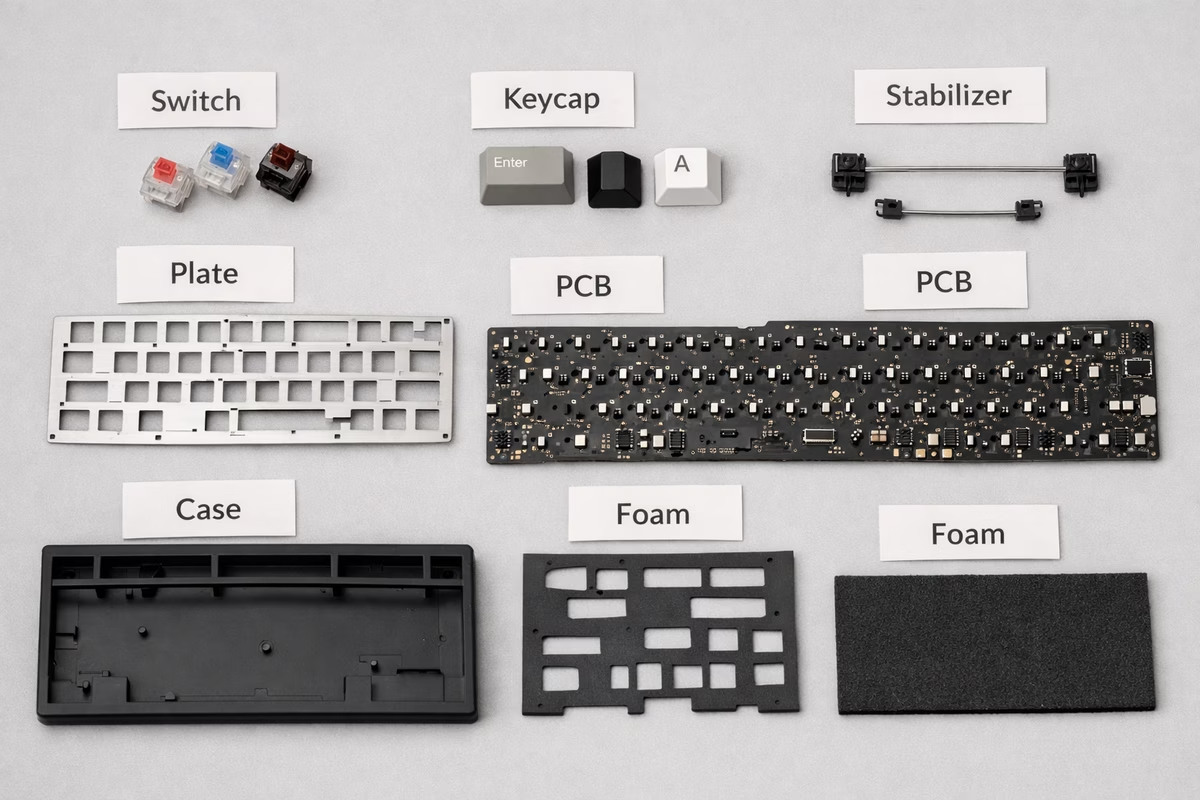
Case The outer housing of the keyboard.
Daughterboard Small separate PCB used for USB connection, often connected to the main PCB with a cable. Helps reduce stress on the main PCB.
Encoder / Knob Rotary control used for volume, scrolling, or custom functions.
Foam Material added to reduce hollowness and change sound. Common placements include case foam and plate foam.
Gasket Mount Premium mounting style where PCB sits on gaskets for softer, bouncier typing feel.
North-Facing / South-Facing LED orientation on the PCB. North-facing LEDs can cause keycap interference with some profiles (notably Cherry profile) on certain rows; south-facing often avoids this.
PCB (Printed Circuit Board) The electronic board that registers keypresses.
Plate Metal or plastic layer between switches and PCB. Provides rigidity.
Plate Material Common materials include aluminum (crisp), brass (stiff), polycarbonate (softer), FR4 (balanced), and POM (muted). Sound/feel varies by board design.
Stabilizer (Stab) Mechanism that stabilizes large keys (spacebar, shift, enter) to prevent wobble.
Stabilizer Types Common types include PCB-mount (screw-in/clip-in) and plate-mount. Screw-in stabs are popular for stability; plate-mount are common on budget boards.
Tray Mount Budget mounting style where PCB screws directly into case bottom.
Weight Metal piece (often brass/steel) added to the case for heft and acoustics. Mostly a feel/finish choice.
Build Techniques & Mods
Band-Aid Mod Placing bandaid under stabilizers to reduce rattle and ticking.
Clip Removing extra plastic from stabilizer housing to reduce rattle.
Desoldering Removing solder to extract components (switches) from PCB.
Filming Adding thin plastic films between switch housings to reduce wobble.
Flash/Flashing Installing firmware onto keyboard’s PCB.
Holee Mod Specific stabilizer lubing technique to eliminate rattle.
Lube/Lubing Applying lubricant to switch components for smoother feel and quieter sound.
Soldering Using heat and solder to permanently attach switches to PCB.
Spring Swap Replacing switch springs with different weights or types.
Tape Mod Adding tape to back of PCB for deeper, “poppier” sound.
Tempest Mod Common mod (often tape-based) aimed at changing case acoustics. Results vary; always avoid blocking electrical contacts or vents that are needed.
Firmware & Software
Bootloader Special mode that allows firmware flashing.
Keymap The mapping of keys/layers/macros that defines what your keyboard does.
Layer Alternative key mapping activated by holding a key (Fn).
Macro Programmed sequence of keypresses executed with single key.
QMK Open-source keyboard firmware. Highly customizable.
VIA Graphical software for programming QMK keyboards without reflashing.
Vial An alternative configurator/firmware ecosystem similar to VIA, often used for more advanced or persistent customization on supported boards.
Sound & Feel Descriptors
Clacky Higher-pitched, sharp sound. Typically from hard materials (aluminum plate).
Hollow Sound descriptor for a case that resonates like an empty shell. Often addressed with foam, different mounting, or a tighter case fit.
Creamy Smooth, buttery typing feel (usually from well-lubed linears).
Marbly Hard, “stone-like” higher-density sound some boards produce. Highly subjective; often influenced by case/plate materials and fit.
Mushy Soft, unclear tactile feedback (usually bad).
Muted Lower volume, less sharp sound (often from softer plates, dampening, or silent switches).
Pingy Metallic spring noise from switch (fixable with lube).
Poppy Sharp, percussive sound with good acoustics.
Scratchy Rough, gritty switch feel (needs lube or better switches).
Thocky Deep, muted, satisfying sound. Highly desired.
Smooth Switch with minimal friction (from factory or lubing).
Typing Terms
Ghosting Keyboard incorrectly registers keys you didn’t press.
Key Chattering Key registers multiple times from single press (switch failure or debris).
Key Rollover Number of simultaneous keypresses keyboard can register.
N-Key Rollover (NKRO) Keyboard can register unlimited simultaneous keypresses.
Typing Angle The angle of keyboard from desk surface (flat, 5°, 7°, etc.).
WPM (Words Per Minute) Typing speed measurement.
Connectivity & Features
Bluetooth Wireless connection standard. Great for multi-device setups; battery life and latency vary by implementation.
Polling Rate How often the keyboard reports key states to the computer (often 125–1000 Hz on wired boards). Higher isn’t always noticeable, but can matter for some gaming setups.
RGB Per-key or underglow lighting using red/green/blue LEDs.
Wireless (2.4 GHz) Low-latency wireless mode using a USB dongle. Often preferred over Bluetooth for gaming.
Community Terms
Barebones Kit Keyboard kit with case/PCB but no switches/keycaps.
Endgame Your ultimate, perfect keyboard (spoiler: it doesn’t exist, you’ll build more).
GB (Group Buy) Pre-order campaign for keyboard products. Often 6-18 month wait for delivery.
IC (Interest Check) Survey to gauge community interest in potential keyboard product.
In-Stock Product available for immediate purchase (vs. group buy).
Microbrand Small, independent keyboard company.
Stabs/Stabilizers Shortened term for stabilizers.
Thock The sound enthusiasts chase (deep, muted, satisfying).
Strap Monster Keyboard that looks good with many different keycap sets.
Abbreviations
ABS: Acrylonitrile Butadiene Styrene (keycap plastic) FR4: Fiberglass epoxy laminate (common PCB/plate material) GB: Group Buy GMK: German manufacturer (keycaps) HE: Hall Effect (magnetic switch sensing) IC: Interest Check MX: Cherry MX (switch standard) NKRO: N-Key Rollover OEM: Original Equipment Manufacturer (also keycap profile) PC: Polycarbonate (common plate/case material) PBT: Polybutylene Terephthalate (keycap plastic) PCB: Printed Circuit Board POM: Polyoxymethylene (acetal; common plate material) QMK: Quantum Mechanical Keyboard (firmware) RGB: Red Green Blue (lighting) SA: Spherical All (keycap profile) TKL: TenKeyLess (80% layout) VIA: Visual keyboard configurator software WKL: Winkeyless (layout without Windows/Command keys) WPM: Words Per Minute
Switch Brands (Quick Reference)
Cherry MX: German, original, reliable Gateron: Chinese, smoother than Cherry, affordable Kailh: Chinese, Box switches (stable, unique), innovative Zealios/Zealpc: Premium tactile switches Boba/Gazzew: Premium tactile (U4T) and silent (U4) Holy Panda: Legendary tactile switch Durock: Good value premium switches Outemu: Budget switches (common in cheap boards)
Common Questions Answered
“What does hot-swap mean?” → You can remove and replace switches without soldering.
“What’s the difference between tactile and clicky?” → Tactile = bump, no click sound. Clicky = bump + audible click.
“What is QMK?” → Open-source firmware that lets you program/customize keyboard behavior.
“Why is GMK so expensive?” → German-made, premium ABS, double-shot, limited runs, high demand.
“What does ’thocky’ mean?” → Deep, muted, satisfying typing sound (subjective, highly sought after).
“What are stabs?” → Stabilizers - mechanisms under large keys to prevent wobble.
Using This Glossary
Start here if:
- Reading keyboard reviews and feeling lost
- Shopping and confused by product descriptions
- Joining keyboard communities and don’t understand slang
- Want to sound knowledgeable when asking questions
Bookmark and reference as you encounter new terms.
No one knows everything! Even experienced builders Google terms regularly.
Next Steps
- Quickstart Guide - Put these terms in context
- Switch Guide - Deep dive into switch terminology
- Building Guide - Learn build-specific terms hands-on